How do browsers work?
Web Browsers
A web browser is a software application that enables a user to access and display web pages or other online content through its graphical user interface.
The browser's main functionality
The main function of a browser is to present the web resource you choose, by requesting it from the server and displaying it in the browser window. The resource is usually an HTML document, but may also be a PDF, image, or some other type of content. The location of the resource is specified by the user using a URI (Uniform Resource Identifier).
The way the browser interprets and displays HTML files is specified in the HTML and CSS specifications. These specifications are maintained by the W3C (World Wide Web Consortium) organization, which is the standards organization for the web. For years browsers conformed to only a part of the specifications and developed their own extensions. That caused serious compatibility issues for web authors. Today most of the browsers more or less conform to the specifications.
Browser user interfaces have a lot in common with each other. Among the common user interface elements are:
- Address bar for inserting a URI
- Back and forward buttons
- Bookmarking options
- Refresh and stop buttons for refreshing or stopping the loading of current documents
- Home button that takes you to your home page
Strangely enough, the browser's user interface is not specified in any formal specification, it just comes from good practices shaped over years of experience and by browsers imitating each other. The HTML5 specification doesn't define UI elements a browser must have, but lists some common elements. Among those are the address bar, status bar and tool bar. There are, of course, features unique to a specific browser like Firefox's downloads manager.
The browser's high level structure
The browser's main components are:
- The user interface: this includes the address bar, back/forward button, bookmarking menu, etc. Every part of the browser display except the window where you see the requested page.
- The browser engine: marshals actions between the UI and the rendering engine.
- The rendering engine: responsible for displaying requested content. For example if the requested content is HTML, the rendering engine parses HTML and CSS, and displays the parsed content on the screen.
- Networking: for network calls such as HTTP requests, using different implementations for different platform behind a platform-independent interface.
- UI backend: used for drawing basic widgets like combo boxes and windows. This backend exposes a generic interface that is not platform specific. Underneath it uses operating system user interface methods.
- JavaScript interpreter. Used to parse and execute JavaScript code.
- Data storage. This is a persistence layer. The browser may need to save all sorts of data locally, such as cookies. Browsers also support storage mechanisms such as localStorage, IndexedDB, WebSQL and FileSystem.
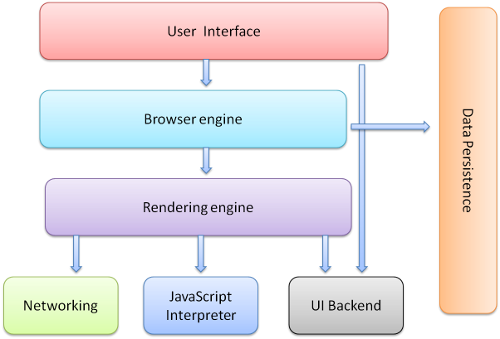
It is important to note that browsers such as Chrome run multiple instances of the rendering engine: one for each tab. Each tab runs in a separate process.